WellDesign API Reference
Overview
Oliasoft WellDesign is a comprehensive well engineering platform that revolutionizes the well planning process.
The WellDesign API enables programmatic access to all major well planning capabilities, supporting both manual workflows and automated machine-to-machine integrations. With truly open APIs, you can integrate WellDesign into your existing digital ecosystem or build custom automated design generation workflows.
Oliasoft WellDesign offers two types of endpoints.
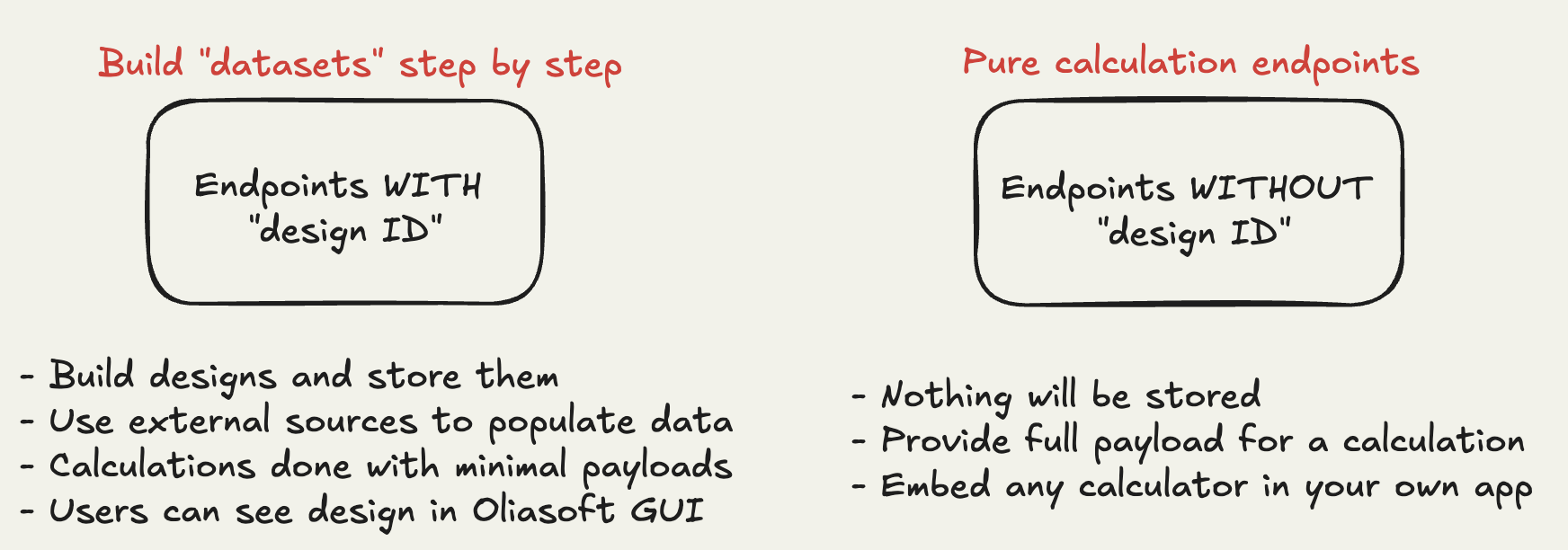
API Endpoints Overview
Available Endpoints
The following endpoints are currently available in the WellDesign API.
Base URL
All endpoints are at the following BASE URL:
https://welldesign.oliasoft.com
Design Management
| Endpoint | Method | Description |
|---|---|---|
| List Designs | GET /api/v3/datasets/list | Retrieve all designs for a company |
| Create Design | POST /api/v3/datasets | Create a new well design dataset |
| Update Design | PUT /api/v3/datasets | Update an existing design |
| Delete Design | DELETE /api/v3/datasets | Delete a design dataset |
Trajectory
| Endpoint | Method | Description |
|---|---|---|
| Fetch Trajectory | GET /api/v1/designs/{designid}/trajectories | Retrieve trajectory with computed survey points |
| Create Trajectory | POST /api/v1/designs/{designid}/trajectories | Create a planned or actual trajectory |
| Edit Trajectory | PATCH /api/v1/designs/{designid}/trajectories/{trajectoryid} | Update trajectory name, points, or survey programs |
| Delete Trajectory | DELETE /api/v1/designs/{designid}/trajectories/{trajectoryid} | Delete a trajectory |
Survey Runs
| Endpoint | Method | Description |
|---|---|---|
| Fetch Survey Runs | GET /api/v1/designs/{designid}/survey-runs | List all survey runs for a design |
| Fetch Survey Run | GET /api/v1/designs/{designid}/survey-runs/{surveyrunid} | Retrieve a specific survey run by UUID |
| Create Survey Run | POST /api/v1/designs/{designid}/survey-runs | Create a new survey run with points and tie-on config |
| Edit Survey Run | PATCH /api/v1/designs/{designid}/survey-runs/{surveyrunid} | Update survey run name, tool, tie-on, or points |
| Delete Survey Run | DELETE /api/v1/designs/{designid}/survey-runs/{surveyrunid} | Delete a survey run |
Targets
| Endpoint | Method | Description |
|---|---|---|
| Fetch Targets | GET /api/v1/designs/{designid}/targets | List all targets, optionally filtered by name or depth reference |
| Fetch Target | GET /api/v1/designs/{designid}/targets/{targetid} | Retrieve a single target by UUID |
| Create Target | POST /api/v1/designs/{designid}/targets | Create a target (Point, Box, Line, Sphere, Polygon, Cylinder, Rectangle, or StandingCylinder) |
| Edit Target | PATCH /api/v1/designs/{designid}/targets/{targetid} | Update target name, shape, position, or attitude |
| Delete Target | DELETE /api/v1/designs/{designid}/targets/{targetid} | Delete a target |
Well Schematic
| Endpoint | Method | Description |
|---|---|---|
| Fetch Well Schematic | GET /api/v1/designs/{designid}/well-schematic | Retrieve the full schematic (sections, strings, packers) |
| Replace Well Schematic | PUT /api/v1/designs/{designid}/well-schematic | Replace the entire schematic in one call |
| Create Section | POST /api/v1/designs/{designid}/well-schematic/sections | Add a new casing/liner/tieback/tubing/screen/open-hole section |
| Edit Section | PATCH /api/v1/designs/{designid}/well-schematic/sections/{sectionid} | Update a section's parameters or order |
| Delete Section | DELETE /api/v1/designs/{designid}/well-schematic/sections/{sectionid} | Delete a section |
| Create String | POST /api/v1/designs/{designid}/well-schematic/sections/{sectionid}/strings | Add a casing/tubing string to a section |
| Edit String | PATCH /api/v1/designs/{designid}/well-schematic/sections/{sectionid}/strings/{stringid} | Update a string or reorder it |
| Delete String | DELETE /api/v1/designs/{designid}/well-schematic/sections/{sectionid}/strings/{stringid} | Delete a string |
| Create Packer | POST /api/v1/designs/{designid}/well-schematic/sections/{sectionid}/packers | Add a packer to a section |
| Edit Packer | PATCH /api/v1/designs/{designid}/well-schematic/sections/{sectionid}/packers/{packerid} | Update a packer or reorder it |
| Delete Packer | DELETE /api/v1/designs/{designid}/well-schematic/sections/{sectionid}/packers/{packerid} | Delete a packer |
Lithology
| Endpoint | Method | Description |
|---|---|---|
| Fetch Lithology | GET /api/v1/designs/{designid}/lithology | Retrieve the lithology (ordered formations) for a design |
| Replace Lithology | PUT /api/v1/designs/{designid}/lithology | Replace the entire lithology (validates gap-free coverage) |
| Reset Lithology | DELETE /api/v1/designs/{designid}/lithology | Reset the lithology to a default single "Rock" formation |
Getting Started
- Obtain API credentials - Contact your administrator for API keys
- Test connectivity - Start with the List Designs endpoint
- Explore workflows - Check Integration Examples
The WellDesign API is continuously evolving. Check back regularly for new endpoints and capabilities.